Tacho
Tacho Information
The AVT110T/AVT111T can remotely read DDD files from digital tachograph and driver card as a part of telemetric system. Commonly, in order to read files from tachograph, it is necessary to put company card directly into the vehicle's tachograph and download required files with a specific tool. The problem appears when the vehicles are far away in foreign countries but the company card is in the home office.
Data between tachograph and company card is exchanged over the Internet using the existing structure of telemetric system.
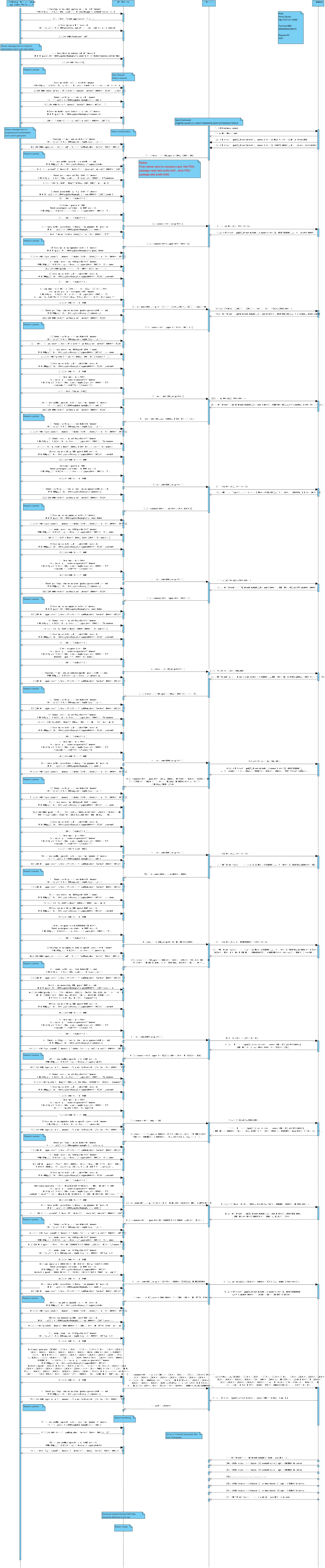
Reference sequence for AVT110T/AVT111T tachograph integration using the TCA. The flow covers application handshake, queued operation pickup, company-card APDU authorization, and DDD file upload to the server.
Participants
| Actor | Role |
|---|---|
| Tachograph Card Authorizer | Desktop application (v1.3.9) that drives card authorization and relays APDU packets. |
| HTTP Server | REST API bridge between the authorizer and the tachograph backend. |
| TCP Server | Transport layer between the HTTP server and the AVT110 terminal. |
| Terminal (AVT110) | On-vehicle device that exchanges AT@TCO commands and +RPT/+LDP events with the tachograph. |
Flow overview
Phase 1 — Application handshakeThe Card Authorizer checks the latest application version and logs in before any tachograph operation begins.
GET /api/tachograph/v1/tachoappinfo?current_version=1.3.9POST /account/zaloguj (username/password)
Phase 2 — Queue polling and operation startThe authorizer polls for queued tasks on online devices, then starts and monitors the tachograph request.
GET /api/tachograph/v1/queue?limit=1&status=queued&online=trueGET /api/tachograph/v1/requests/{id}POST /api/tachograph/v1/requests/{id} — start authorization
Phase 3 — APDU card authorizationThe terminal exchanges AT@TCO commands and +RPT events while the HTTP server relays APDU packets between the device and the Card Authorizer until authorization succeeds.
Terminal sends AT@TCO=at,1,... commands with seqnum+RPT Event Type(25) — APDU request/response eventsPOST /api/tachograph/v1/apdu/{device} — company card responsePOST /api/tachograph/v1/apdu/{device}/commit and /dequeueGET /api/tachograph/v1/apdu/{device}/status — authorization status
Phase 4 — DDD file uploadAfter authorization, the terminal uploads the DDD file in LDP frames and reports upload progress via +RPT events.
+RPT Event Type(26), state(01) — start upload+LDP messages — frames 1..N to server+RPT Event Type(26), state(02) — upload success
API endpoints
The diagram uses example URLs on http://127.0.0.1:8080. Replace the host with your production tachograph API endpoint.
| Method | Path | Purpose |
|---|---|---|
| GET | /api/tachograph/v1/tachoappinfo | Check latest tachograph application version |
| POST | /account/zaloguj | Authenticate the card authorizer session |
| GET | /api/tachograph/v1/queue | Fetch queued tachograph operations for online devices |
| GET | /api/tachograph/v1/requests/{id} | Read operation status and progress |
| POST | /api/tachograph/v1/requests/{id} | Start operation authorization |
| GET | /api/tachograph/v1/apdu/{device}/status | Get current APDU operation status |
| POST | /api/tachograph/v1/apdu/{device} | Submit company card APDU response |
| POST | /api/tachograph/v1/apdu/{device}/commit | Commit processed APDU packet |
| POST | /api/tachograph/v1/apdu/{device}/dequeue | Dequeue next APDU packet from the session |
Sequence diagram
The sequence diagram below documents the full message exchange between the Card Authorizer, HTTP/TCP servers, and the AVT110 terminal. Step labels and technical payloads in the diagram are in English.